
Turn a worksheet photo into illustrated reading
Last updated: June 2026
Not sure they understood what they read? Snap tonight's school page—get illustrations, Word Gems, and comprehension you do together, then print and verify. Not another book library: built for the page in the backpack.
Snap tonight's school page → illustrated reading + Word Gems + questions → print → verify together.
k5 Genie turns a plain K–5 worksheet or story page into illustrated reading with Word Gems, questions, and printables—parent co-play beside your child, not kid-alone AI chat.
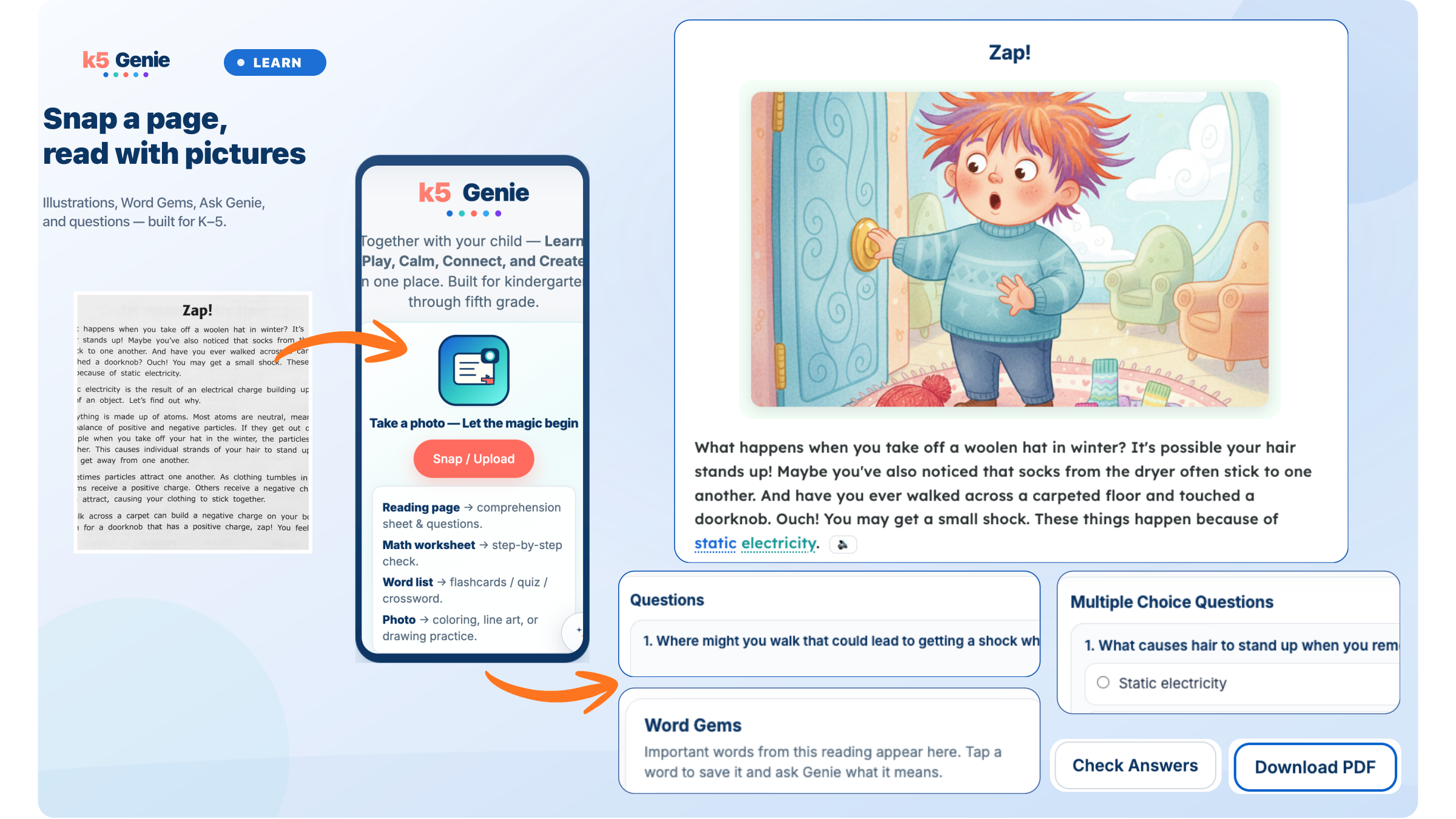
How it works
- Snap or upload the page. Open Read with Pictures and photograph the workbook page, upload a PDF, paste text, or pick a Golden Story—whatever you have in hand on a homework night.
- Get a readable layout with illustrations. k5 Genie structures the story or passage, adds Word Gems for tricky vocabulary, comprehension prompts, and optional illustrations—on screen or as a PDF you can print. Tap Read aloud on any paragraph to listen together.
- Stay side by side; verify when ready. Read aloud together, answer questions, then photograph the filled worksheet back for step-by-step checks. You choose when to run AI tools.
What’s included in Read with Pictures
Features you can use tonight on the same school page—no separate apps.
-
Read aloud
Tap any paragraph to listen together before you explain tricky words or move to questions.
-
Word Gems & L1 meanings
Vocabulary pulled from the page, with optional meanings in Hindi, Spanish, Gujarati, Tamil, Arabic, and more.
-
Golden Stories
No worksheet tonight? Open a classic tale instantly—same illustrated reading flow, ready when you are.
-
My Readings
Every page you build saves to your library—reopen a story sheet or assignment across multiple nights.
-
Verify Reading
Print comprehension questions, fill them together, photograph the completed sheet back for fast checks.
Safe for families
- Parent account only — no child profiles or kid self-login.
- You control AI — Genie Points run only when you tap generate or verify.
- Co-play, not solo chat — printables and verify, not open-ended kid-alone AI tutoring.
- Photos for reading and verify — see Privacy for what we collect.
How k5 Genie compares
Fair snapshot for homework nights—not a replacement for every reading app you already use.
| What you need | k5 Genie | ReadBuddy | Kwezzly | ReadTheory |
|---|---|---|---|---|
| Starts from | School worksheet / PDF / paste | Library book cover | Book page photo | Platform passages |
| Illustrations | Yes (optional) | No | No | No |
| Print + verify | Yes | No | No | In-app only |
| Use mode | Parent co-play | Parent + app quiz | Parent dashboard | Kid-solo login |
Details: vs ReadBuddy · vs Kwezzly · vs ReadTheory · vs Khan Kids
Who this is for
Families with K–5 readers who bring English pages home from school—especially when you want bilingual help on the same page, printables for the kitchen table, or proof your child understood before moving on.
What you need
- A parent or guardian account at app.k5genie.com
- Phone, tablet, or computer with a camera (helpful for worksheet photos)
- 80 free Genie Points on every new account — how points work
FAQ
- Can I photograph any school reading page?
- Yes—snap the workbook page, upload a PDF, paste text, or use a Golden Story for tonight's reading.
- Does k5 Genie replace the teacher's assignment?
- No. You work through the same page together with illustrations and questions—it supplements school work.
- We already use ReadTheory, Khan Kids, or Epic—do we need k5 Genie?
- Keep those for practice and libraries. Use k5 Genie for tonight's worksheet from the backpack—illustrated reading, print, and verify. See vs ReadTheory.
- How is this different from ReadBuddy or Kwezzly?
- They generate questions from a book cover or page photo. k5 Genie adds illustrations, Word Gems, a printable sheet, and snap-back verify on school work. vs ReadBuddy · vs Kwezzly
- How is this different from Khan Academy Kids?
- Khan Kids is free kid-solo practice. k5 Genie starts from your worksheet photo with co-play and parent verify. See the comparison.
- Do I need to sit with my child?
- Yes—k5 Genie is parent-driven co-play. Adults register and stay beside their K–5 child.
- Can k5 Genie read the page aloud?
- Yes—tap Read aloud on any paragraph in Read with Pictures to listen together.
- What are Golden Stories and My Readings?
- Golden Stories are classic tales you can open instantly when there’s no school page. My Readings is your library of past pages to reopen anytime.
- Is this the same as Story Adventures?
- No—Story Adventures are themed choose-your-path fiction. Worksheet reading starts from your child's school page.
Related: parent verify homework · comprehension at home · signs they didn't understand · grade 2–3 reading help · all comparisons · bilingual flashcards